

This post may contain affiliate links. Please read our disclosure policy for more information.
The idea of Pinning or saving images and Pins is to collect and gather ideas that inspire you.
So, in today’s article, I am going to teach you how to Pin images on Pinterest the right and proper way.
When I was a new Pinterest user a few years ago, I had no clue what I was doing when I was saving images to my boards.
I had Pinned my favorite home décor and DIY crafts to my boards, but I didn’t know I was supposed to properly name and categorize those boards.
For example, I saved everything into a board called “things for me to do” or “new projects to try.”
It wasn’t until I learned that I could make money online by using Pinterest that lead me to learn how to use the platform properly.
I had absolutely no idea that you could make money online using Pinterest by starting a blog and creating content so you can Pin to your boards.
You can even check out how I am making over $20,000 per month with a small blog today all because I decided to start my blog and learned how to save Pins on Pinterest the right way.
The thought of making money with Pinterest NEVER crossed my mind because I was just a normal Pinterest user looking for something beautiful, relevant, helpful, and inspiring to Pin into my boards.
Where else would I have come across the idea of learning how to flip furniture and make money with a fun hobby like this?

Before makeover

After makeover
Whether you’re looking for a delicious chicken recipe to make or some DIY furniture ideas for you to tackle over the weekend, there is a proper way of saving and Pinning images on Pinterest. This is especially important if you are a content creator and using Pinterest for your business.
In the remaining article, I am going to show you how to Pin on Pinterest!
If you’re new to using Pinterest for your blog or business, you’ll also want to check out this tutorial on how to make board covers for your Pinterest business profile.
How To Pin On Pinterest
As you may already know, Pinterest wants users to save, collect, and organize their Pins into related boards and categories.
By pinning Pins into relevant boards, which will be discussed in the section, “Pinning Pins To Relevant Boards,” Pinterest is able to learn and recognize what your boards and Pins are about.
For example, if a blog post is about “10 Meatless Dinner Recipes,” Pinterest will expect users to save this Pin into boards that are about “Family Dinner Recipes,” “Meal Planning For Vegetarians,” “Healthy Eating & Living,” etc.
There are a ton of board titles that this Pin can be saved to. The more related the board name is, the better it is for your content because Pinterest will recognize this Pin is about food or recipes.
NOTE: You don’t want to confuse Pinterest by saving your content about “10 Meatless Dinner Recipes” to boards like “My Travel Plans” or “Makeup Tutorials”
Now that you understand why Pinterest wants us to save Pins to relevant boards, I’m going to show you various ways to Pin on the platform.
1. Pin On Pinterest Using The Pinterest Search Bar
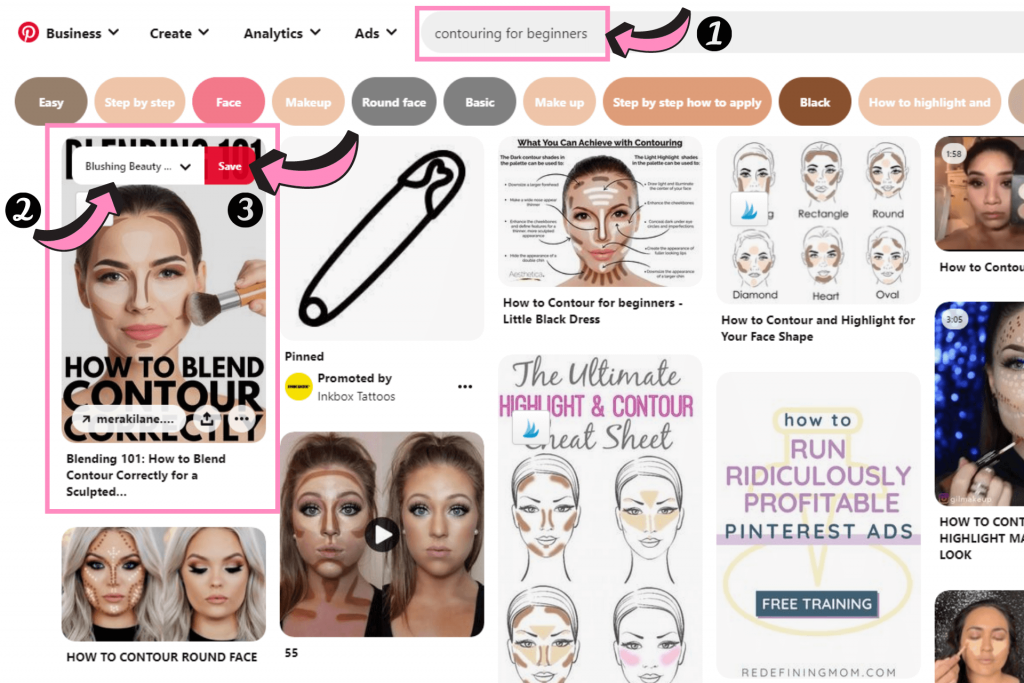
Step 1: Search for a keyword or phrase that you named your board. Let’s suppose you are in the beauty niche and you named your board title “Contouring For Beginners.” Using Pinterest search is one of the best ways to save pins to your boards because Pinterest already recognizes these pins as the proper categories.
Step 2: Save 1-2 pins to your board called “Contouring For Beginners” by hovering over the pin. Use the drop-down box to select the board you want to pin to.
REMINDER: Before saving any Pin into your board, always make sure this Pin is legitimate, and NOT a spam. I will teach you how to avoid saving spam Pins at the end of this article.
2. Pin On Pinterest By Saving Pins From “More like this” Section
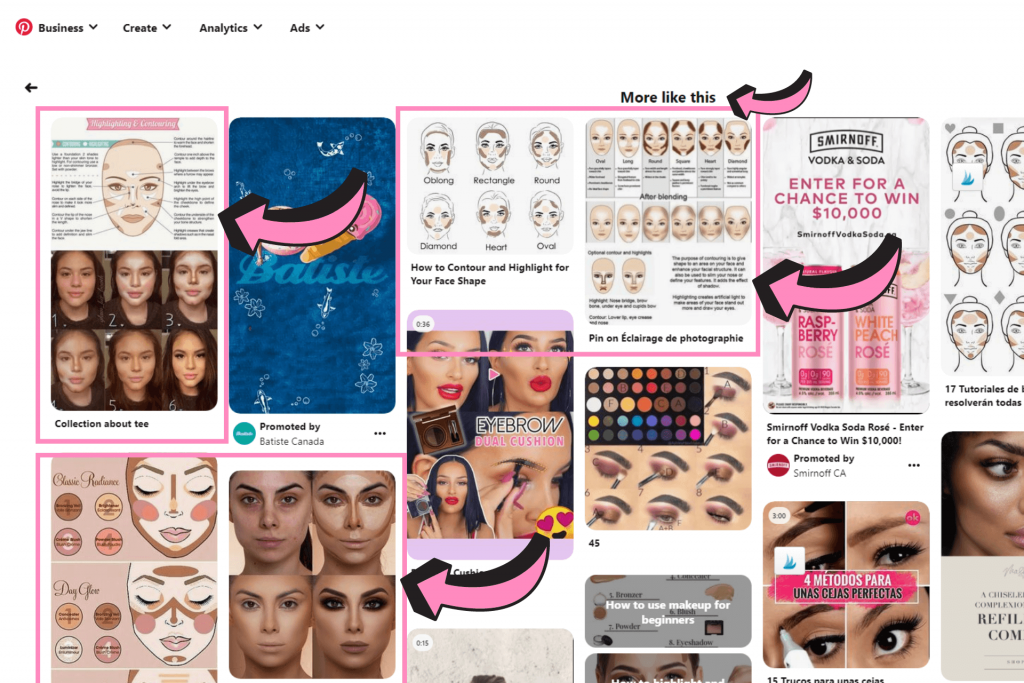
Step 1: Suppose you clicked into the Pin from method 1 when you were searching for “Contouring For Beginners.” Anytime you click into any Pin and you scroll to the bottom, you’ll see a section called “More like this.”
Step 2: Save your Pin into an appropriate board. As you can see, Pinterest shows you results that are related or similar to the search, “Contouring for Beginners” and these pins are good to save into any board that is about contouring, makeup, or beauty.
3. How To Pin On Pinterest By Pinning From Your Home Feed
The moment you log onto Pinterest, either through mobile or phone, you’ll be on your homefeed. This activity feed recommends Pins based on your overall search and what you generally look for. When you’re scrolling through your Pinterest home feed, you can also directly save the Pin you like into your relevant boards.
General Pinning Tips For Beginners
As a beginner, I recommend consistently Pinning 5 to 10 pins a day.
If you haven’t started your blog yet nor have content to Pin or to share on Pinterest, you can go ahead and save 10 Pins from other content creators.
PRO TIP: Pinterest does not recommend pinning more than 25 to 30 pins a day. Pinning more than this suggested amount may increase the chances of your account being flagged as a spam.
For those of you who have your own Pins, you can mix it up with other bloggers’ Pins.
If you have only 10 blog posts, you can start off by Pinning 1 different blog post per day to different boards, and 5 to 8 of other people’s Pins. For now, we just want you to get started and make your Pinterest account active as you spend time creating more content and building your blog.
According to Pinterest’s best practices for success on Pinterest:
It’s a good idea to save Pins regularly—consistent, daily activity is better than a once-a-week flurry. Be patient and stick with it. Unlike social networks where all of your audience reach typically happens in the first 24 hours, the reach of your content on Pinterest will continue to grow over time as Pinners discover and save your Pins. Publishing consistently over consecutive months is the best way to build a dedicated audience.
To stay safe, you can follow these Pinterest guidelines here.
Again, make sure the Pins you save into your boards are relevant and align with what your board is about. I explain more details about how to save Pins to a relevant board in the next section.
Pinning or Saving Pins To Relevant Boards
When you’re saving Pins into your personal boards and/or Pinterest group boards, ALWAYS make sure you are Pinning Pins that are RELEVANT to that board.
For example, let’s say your pin leads to a blog post about “Easy Hairstyles for Women With Short Hair” or “How To Curl Short Hair For Women” that looks something like this:
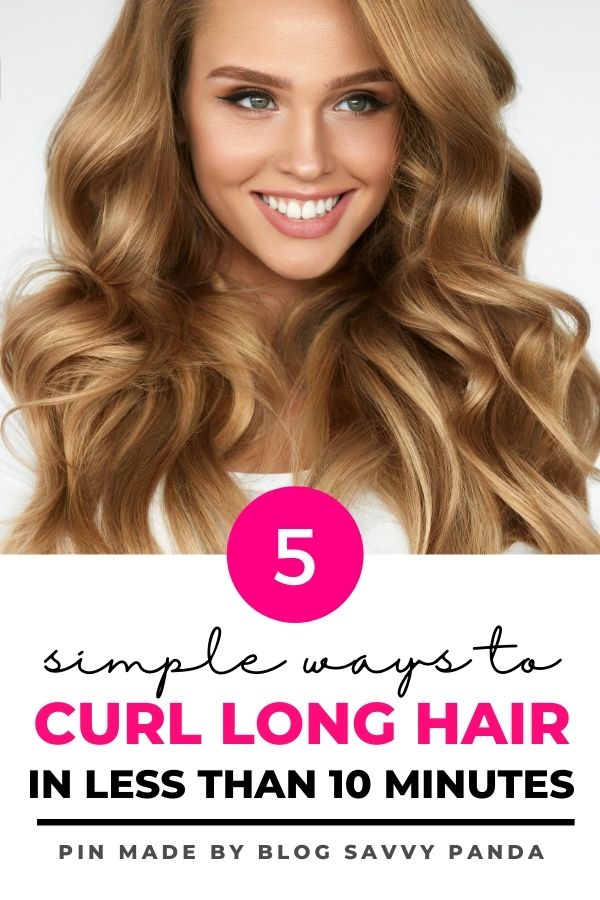

Be sure to save that pin to boards that are related to this topic. Board names or titles like these are okay for you to save the pin into:
- Hairdos
- Hairstyle for women
- Hairstyle for party
- Beauty tips
- Beauty hacks
The more focused and narrow the board is (e.g. in this case, “hairdos”, “Hairstyle for women” or “hairstyle for party”) the better it is. However, it doesn’t mean you can’t and shouldn’t pin to other more general boards like “beauty tips” or “beauty hacks” because it’s still relevant. You still want to save that Pin and reach an audience who may be interested in general beauty and hairstyling tips.
However, NEVER save a Pin about hairstyle to a board that’s about chicken recipes, exercise routine, or winter coats!
By saving Pins to relevant boards, you are telling Pinterest what that Pin or content is about. You don’t want to confuse Pinterest thinking it’s about losing weight, healthy living, or a ground beef recipe.
Here’s one more example to help you make sound judgment when pinning your content going forward.
Let’s say your blog post is “Quick Dinners To Make On Busy Weeknights” and your Pins look something like this:
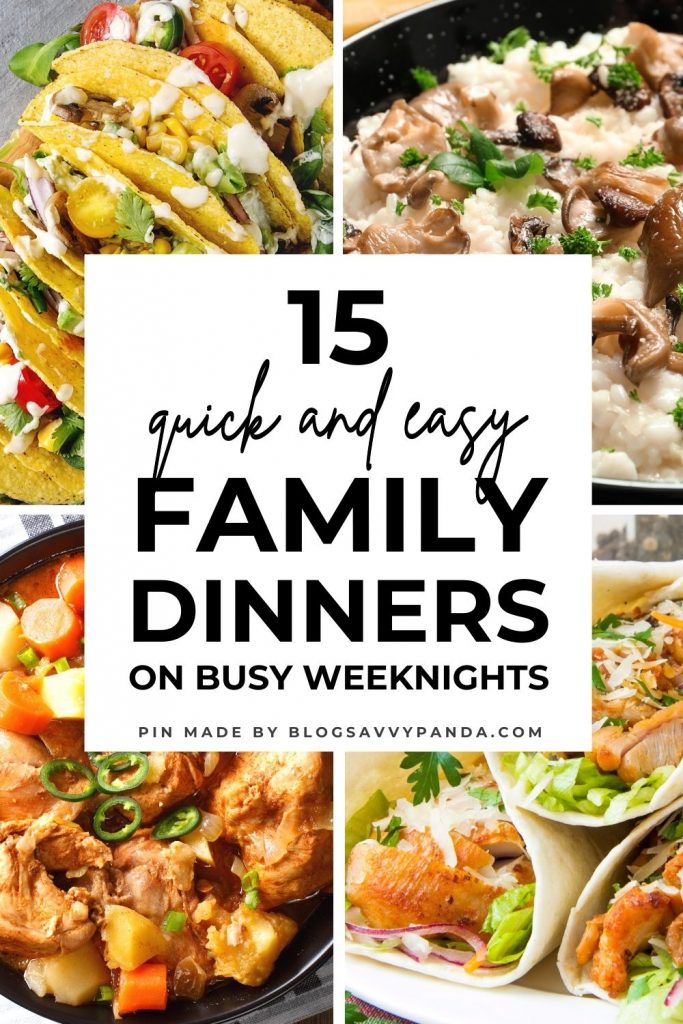

You can save this Pin into food or recipe related boards like:
- Dinner Recipes
- Family Dinners
- Budget Meals
- Chicken Dinners
- Cheap Dinners for Broke People
You could also save this to boards like:
- Saving Money
- Budgeting Tips
- Frugal Tips
That’s because your post about family dinners includes budget-friendly recipes that will help your readers save money on food. There is an audience in personal finance who is looking for ways to save money on their meals.
However, I HIGHLY recommend saving a Pin like this to boards like “Dinner Recipes” or “Family Dinners” FIRST (this is a priority) before you resave it to another board called “Frugal Tips.” You want Pinterest to recognize it MORE as “Family Dinner Meals” rather than “Frugal Tips.”
Avoid Saving Spam Pins on Pinterest!
Now that you know how to Pin (or save) Pins on Pinterest into your personal boards and group boards, I’m going to teach you how to avoid saving spam pins.
You need to be aware that there are a lot of spammers on Pinterest who steal legitimate bloggers’ Pins by directing them to spammy websites, so be careful when you are Pinning or saving images into your boards.
PRO TIP: It’s always a good practice to click into the Pin first and make sure the URL or website it brings you to is NOT a spam site. Turn this “check” into a habit to save yourself and other legitimate content creators from getting into trouble with the Pinterest police!
The moment you land on a blogger’s page, you should be able to tell whether the site looks spammy or if the person is legitimate (use your own judgment). If it’s a legitimate blogger, proceed to save the Pin into your relevant board.
Usually, a spam website would be cluttered with ads and/or contain irrelevant or shady content. Some have a little bit of content but the things they write on the page don’t make any grammatical sense nor does it tie back to the title of the original pin. I see SO many bloggers who make the mistake of saving spammy Pins without realizing it. This also includes those who are experienced with Pinterest!
I am just warning you that there are many people who steal bloggers’ Pins and redirect them to their spammy URL. Some people even redirect it to their normal website, but it “appears” to look legitimate – yes, it’s sad but true.
Overall, just be careful and make sure you are saving legitimate Pins/content.
As you become an experienced user on Pinterest, another quick way to check is to hover your mouse over the Pin. You’ll see the website URL appear at the bottom-left of the Pin. If it looks suspicious or untrusty worthy, don’t save it!
Final Word on How To Pin On Pinterest
As you have learned, Pinterest is a place where users and Pinners can collect and gather the things they love.
Pinterest is a place for inspiration and tips!
When you save on Pin on Pinterest, be sure to save them to boards that are relevant and related to what the Pin is about. For example, if a Pin is about acrylic nails, don’t save that to a board that is about chicken recipes. Pinterest will get confused.
There are three different ways to save Pins on Pinterest and they include:
- Finding and saving them from the Pinterest search
- Browsing through the “More like this” section when you click into a Pin you like or inspired by
- Pinning them directly from your home feed when you log onto Pinterest
A final word of caution is to double-check and make sure the Pin you save is not a spam Pin. In other words, the Pin image should tie back to what the content is about on the blogger’s website. On top of that, the link to the website shouldn’t look suspicious. If your gut feeling tells you that the Pin is not created by the original blogger, you should avoid saving that Pin.
That’s it for today, folks!
I hope you found this tutorial on how to Pin on Pinterest helpful! 🙂

Hi Ling.
Can you please tell me the pin sizes that you use? For the long pins and medium pins?
I am currently using 1000×1500 and I don’t think it’s working for me :(…
Do you think the longer pins get more clicks?!
Would be of great help if you share all the pin sizes that you use 🙂
Thanks in advance :))
@Tend
Optimal is 1000 by 1500 px according to Pinterest. You can use longer ones too if you want. I have a mix of sizes and can’t remember all of the sizes (I don’t think size matters too much based on my personal experience). But one I use is 1000 by 1700 or 1750 px. You should try a variety. I honestly don’t pay attention to size because your click in rate depends on sooo many other factors like headlines, design, proper keywording, and honestly your niche/topic plus how you frame your titles to speak to your audience on that platform; you also can’t forget about their algorithm which is uncontrollable.
Despite all that, I still try to include their optimal size too since they keep harping at it. I don’t like their optimal size though lol.
I have a bunch of pre-made Pinterest templates here that will help make it easier for you when you use Canva. You’ll get the exact templates I use for my other sites too that bring in over 100,000 monthly pageviews to the blog.
https://www.finsavvypanda.com/canva-pinterest-templates/
It says 30 pin templates but I have an additional bonus of 30 more templates ready for anyone to use, so you’ll get over 60 templates in there for any blog niche. It also comes with a Pin Savvy ebook for quick additional tips, title hacks, and on how to use and design the pin templates optimally.
I hope this helps! 🙂
Hi Ling
This is Hodeis. thanks for the information, it was really helpful.
I started my Pinterest page in 2013, I had 490k viewers, but for some reason which I don’t know what is that my viewers drop to 339.
Would you please tell me what happened?
Appreciate 🌸
Hey Hodeis
Are you pinning consistently with a strategy? I’m currently sending out pins with a pinning strategy and using my pin templates to make a bunch of pins so I can schedule them out I’m advance – setting it and forgetting it for months ahead of time:
https://www.finsavvypanda.com/canva-pinterest-templates
It also depends on your niche. Crafting, food, arts, fashion, beauty and anything related to lifestyle generally performs better.
On top of that, you should focus on the clicks into your blog and not so much of the monthly views. The clicks will tell you your amount of pageviews to your website.
Hi Ling
My name is Joy. I am currently building my Pinterest page in preparation for my upcoming blog but I have one issue my monthly views dropped from 2k per month to 0 and I have no idea what’s going wrong. please help
Hey Joy
I recommend focusing on the number of clicks back to your blog and NOT monthly views.
You might be seeing zero right now because you account is still new, you’re not very active nor consistent.
I recommend staying active and continue to develop a solid pinning strategy.
Hey dear, it’s Simran from womenallabout.online. I have started my blog on November 1 and I am a frugal living blog. I make a lot round-up post about anything and everything which is famous on Pinterest but still, I am not getting any viral pin. I am pinning 20 pins a day. Please tell me what should I do?
Hey Simran
It’s most likely your blog and Pinterest account is still too new.
It takes time for Pinterest to trust your account and start giving you traffic, while you are being consistent with your pinning strategy. From my personal experience. using Tailwind Communities can help when sharing exists, so if you aren’t on the TW Communities plan, I recommend it. 🙂
Hey Ling,
Thank you for helping so much.
I wanted to know how to generate proper traffic from Pinterest because struggling with that part.
Hi Riya,
Which part are you struggling with, and what methods have you tried/tested?
Have you created boards and Pins with optimized descriptions for Pinterest SEO? Are you doing A/B testing with your Pin design and titles? Also, do you have a solid pinning strategy?
Have you invested in any Pinterest course or resource and followed through?
Those are important for me to know in order to help you. 🙂
Hi Ling,
My blog is up and going but I’m struggling to figure out a Pinterest strategy. I’ve read tons of the free posts about what to do and still feel a little lost.
I only have a handful of blog posts but how many pins should I make for each post? How often and where should I be pinning them? I don’t plan to use tailwind at this point.
Any strategy you have for starting a Pinterest routine that will work to grow traffic would be great.
Hi Amy
That’s great to hear that your blog is up and running!
When you are a beginner using Pinterest, it can become a little confusing to understand but you’ll get the hang of it once you pump more content and promote more of your posts!
Since you’re still new, I recommend starting off pinning a few each day and gradually boosting that number up once you have more content to promote. I personally don’t pin more than 10 a day.
I know many people are making a lot of pins for each post – like up to 10 different variations and styles. They are trying different pin styles to test which one works best for them and this is especially true when you are new to the platform and haven’t used it for long.
Pinterest is a long-term game, so it may take your pins a few months before they gain any traction with a new account. Pinterest doesn’t give instant love to brand new accounts just yet. It’s like you have to earn its trust first, and once it trusts you, you need to be consistent and nurture your account. That’s when Tailwind can come in and help with the auto-scheduling.
I don’t know how far you are with setting up your Pinterest account (e.g. profile, making boards, etc.), but I have more information here regarding those aspects for beginners.
I also recommend making more relevant boards that are closely tied within your niche, so you have more places to pin them to once you come up with a pinning strategy that works best for you.
Since your blog is really new, you may not need Tailwind just yet. Manual pin until you understand how the platform works before you invest in a TW plan. I do find the TW communities helps with sharing though – worth it once you’re ready!
I hope this helps! Feel free to keep me in the loop with your progress 2-3 months down the road. 🙂
I just started a blog last month and am trying to grow my Pinterest account. In the beginning, I did everything manually, then I started using Tailwind for automation, but then my monthly views plumbed (from 15k to 2k / month).
Are you using Tailwind for Pinterest? Or do you schedule pins manually? How often do you pin your own ‘fresh’ pins? And in what ratio to others’ pins?
I look forward to hearing from you.
Thank you in advance!
Hi Melle
Your blog is still VERY new, so I wouldn’t worry about it. It takes a few to several months for Pinterest to trust your new blog and account, so should see your traffic increase gradually when you are consistent with your pinning strategy.
It’s normal to see fluctuations with your Pinterest monthly views. I would not look at the “monthly views” to measure anything. Instead, I recommend focusing on your outbound clicks, which means the actual clicks into your blog or website. You can find this under the Analytics tab within your Pinterest business account.
I switch on and off between TW and manual pinning. At the moment, I’m using manual pinning for one of my Pinterest accounts. For my other blog, I am using Tailwind. It doesn’t matter which method you use. It all depends on your pinning strategy and whether you’re creating content pinners and followers want.
This may change but currently, I don’t pin more than 10 fresh pins per day including sharing other people’s content. You can pin more of your own and try 70/30 or 60/40.
I hope this helps! 🙂
Hi Ling
I’ve created my first 11 Blogs. I’m currently pinning on Pinterest it has been a week and I’ve already got 400 monthly views.
I wanted to ask whether this growth is slow or is it normal and how can one join group boards as I have tried mailing a couple admin and group board owners and haven’t received any responses.
Also, how can I get more outbound links to my website?
Looking forward to your favorable response.
kind regards
Luxolo
Hey Luxolo
Wow! 11 blogs is A LOT!
These are all self-hosted (NOT the free ones), right? If they are not self-hosted, I recommend using this tutorial to start a self-hosted blog because the “free” ones are not a right fit to monetize a blog:
https://www.blogsavvypanda.com/how-to-start-a-wordpress-blog-on-bluehost/
One week is very new and way too soon. Using Pinterest to drive traffic to your blog, where it can make money, takes time and it is NOT overnight.
You cannot expect fast and overnight results. This is very unrealistic.
Based on my experience, it takes Pinterest four to five months realistically to start trusting your blog and understanding what your website is about. You also have to be consistent with your pinning strategy on Pinterest!
I have a post here that talks about how to join group boards:
https://www.blogsavvypanda.com/how-to-join-group-boards-on-pinterest/
When you are asking about outbound links, I am assuming you’re talking about backlinks for Google SEO purposes? I recommend you using a platform called help a reporter out (HARO).
Let me know if that helps! 🙂
Hi Ling. Love your site! Very interesting and lots of information. I would like to know how it would be possible for me to write a blog? First of all spanish is my first language and I am fluent in english but writing is another thing.
Is there a way that I could still do this?
This is the reason why I never thought that writing a blog could be a thing for me and wanted to try making a profit using Pinterest without a blog.
I would greatly appreciate your advise.
Kindly,
Melissa
Hi Melissa!
I am glad that you enjoy my website!
Similar to you, I never thought that I could start a blog to earn a full time income until I actually tried it and saw results myself!
I am a little surprised because I never considered myself a great writer of any sort.
If you are looking for a way to make money by using Pinterest, my top recommendation is to start a blog. Your blog is a platform where you can attract partners/companies and readers to come onto your page.
Your blog is where you have the opportunity to make money online using methods like display advertising on your website, partnering with affiliates and recommending products or services, creating your own digital products for readers and sponsorship opportunities.
You can also set up a shop using your website and sell your products where you can connect it to Pinterest as well. As you can see, having a blog is just more flexible and allows you to do so much more!
I’ve heard many people talk about earning money using Pinterest without a blog, however I personally truly believe that starting a blog is more effective than not having one. You can also use it to build relationship with your readers which increases the chances of converting them into buyers.
Let me know if this advice helps! I hope this gives you the confidence to start your blog. Let me know if you have any questions about starting. I am always happy to help and guide my readers. 🙂
Hi Ling,
My name is Jean and I just started a new blog this year. I have been using Pinterest from the very beginning to try and grow my blog but the only problem is, I’m receiving less than a hundred impressions and no link clicks at all.
At the moment, I create about 20 new pins for each blog post and pin roughly 3 each day. I’m making sure to use keywords and stuff but my blog and Pinterest just isn’t growing. I was thinking that it was because my account is new and that it’ll slowly grow.
But I’d like to know if I’m doing anything wrong now, so I can fix it.
Looking forward to hearing from you
Jean
Hey Jean
Just starting this year is STILL VERY new! That’s about 2 months?
Your account is definitely very new and it will take time for Pinterest to trust your account before they start distributing your pins to show more impressions. Less impressions usually leads to less clicks because it’s not showing to enough people yet.
It does take time for your account to grow.
I recommend continuing what you’re doing and at the same time, continue to pump out content.
It will all also depends on your niche – crafting, home decor, motherhood, fashion, beauty, etc. tends to perform better!
Keep me posted in about 2-3 months on your progress! 🙂